01
Reduce support overhead
Help desk teams can guide users to one centralized workspace instead of walking through scattered Windows menus and settings.
Built to simplify daily access, reduce support friction, organize employee workflow, and give teams one familiar place for Windows tools, browser portals, internal systems, and support resources.
Help desk teams can guide users to one centralized workspace instead of walking through scattered Windows menus and settings.
Users can access Windows tools, payroll, timesheets, HR portals, support links, and approved browser shortcuts from one structured environment.
Administrators and power users can reach important Windows controls quickly from one organized interface.
Departments, schools, training programs, and shared work environments can guide users through approved tools, portals, and daily workflow from one simplified interface.
Complete PC Control Center combines organized Windows control, company workflow access, deployment awareness, and enterprise infrastructure experience into one structured workspace environment.
These screens show the real interface, the available controls, and the visibility users get when working inside Complete PC Control Center.
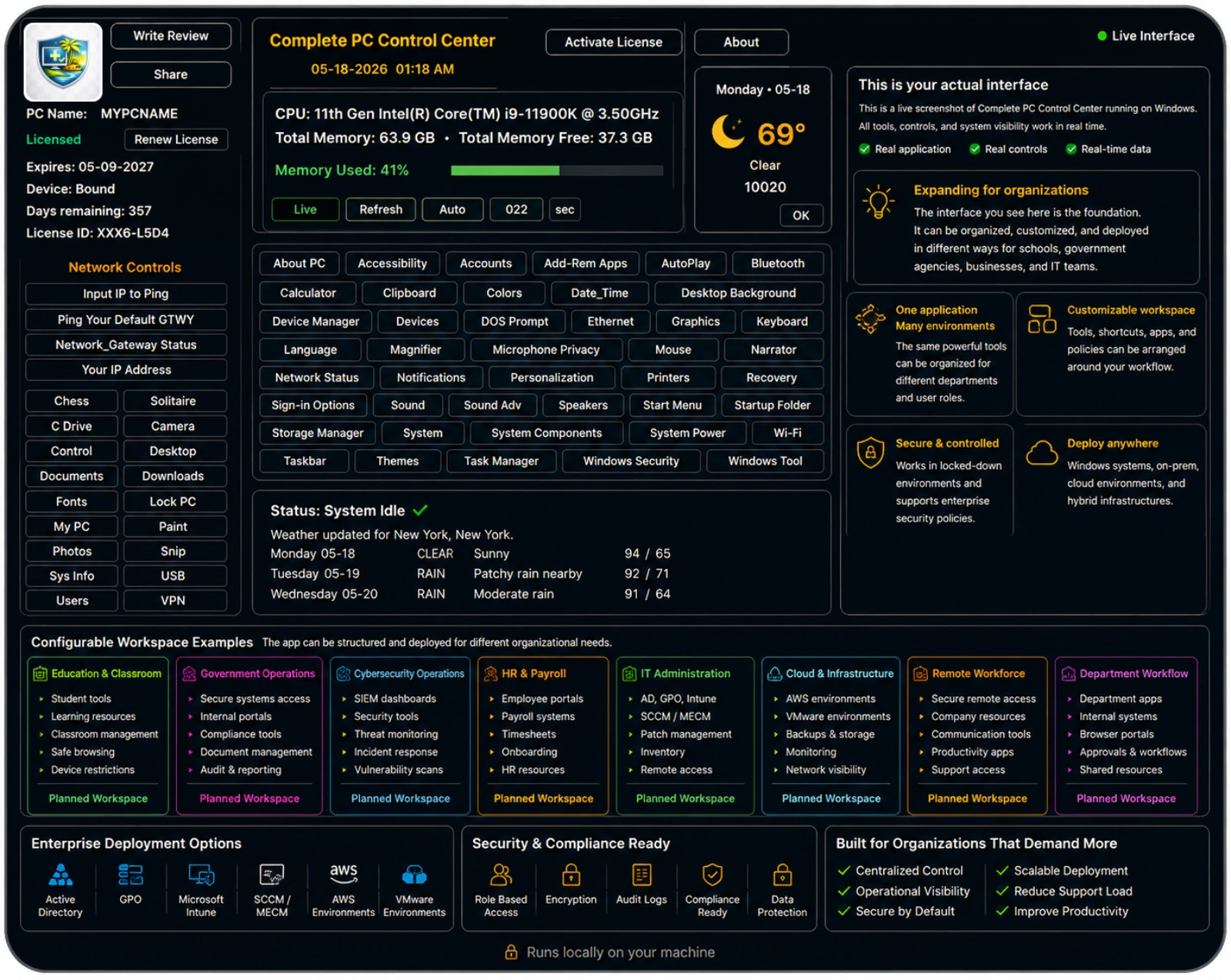
Built from real enterprise infrastructure, operational workflow, systems administration, security focused environments, and deployment experience.

Complete PC Control Center is designed as a configurable organizational workspace for companies, schools, agencies, support teams, and enterprise environments that need clearer access to Windows tools, internal systems, browser portals, help desk resources, HR, payroll, timesheets, deployment workflows, and department specific tools.
The platform is shaped by real experience across infrastructure operations, systems administration, security focused environments, scripting, programming, API automation, cloud platforms, endpoint support, and regulated operational workflows including local, state, federal, and enterprise environments.
Practical examples of how Complete PC Control Center can be organized around real departments, enterprise tools, infrastructure operations, cloud environments, and approved organizational workflows.
Feedback from organizations and users using the platform.
Common questions from organizations, educators, IT teams, and individual users evaluating Complete PC Control Center.
Complete PC Control Center is a centralized Windows control workspace designed to simplify access to common tools, settings, diagnostics, and administrative functions from one organized interface.
The platform is designed for organizations, IT teams, classrooms, help desks, professionals, and everyday Windows users who want more organized access to important Windows tools, settings, and controls without navigating scattered menus and system areas.
Organizations use it to reduce navigation friction, improve user self-service, simplify support guidance, and help users reach common Windows controls more directly from one structured workspace.
Yes. Schools, training programs, shared learning environments, and digital literacy initiatives can use the platform to help users become more familiar with Windows navigation and system controls through one simplified interface.
Yes. Complete PC Control Center is designed to support structured organizational deployment workflows, including GPO deployment, Microsoft Intune deployment, SCCM / MECM deployment, endpoint management workflows, and MSI packaging.
Open support before you buy, or any time after purchase.